Open top menu
Monday, December 14, 2015
Definition Computer


Computers already become a necessity for everyone. Almost everyone today need a computer to facilitate his work. Sharing this time is about the history of Hardware / Computer hardware and its development, the opposite of the history of the software that I share yesterday. Okay just about history Hardware / Hardware computer.


Definition Computer
The term computer has a broad meaning and different for everyone. The term computer (computer) is taken from the Latin word meaning computare count (to compute or to reckon).

Charles Babbage was a British mathematician nation. He invented a calculating machine called a difference engine in 1822. The engine is used to calculate mathematical tables. in 1833, Charles Babbage's difference engine develops again called analytical engine that can perform any calculations. So this machine is known as General Purpose Digital Computer. Beliaupun considered the father of modern computer because a very large contribution to the world.

In 1937, Prof Howard Aikem, a mathematician from Harvard University. He designing penbuatan a computer capable of performing arithmetic and logic operations automatically. In 1944, Prof Howard Aikem collaboration with companies IBM completed electronically kompute named "Harvard MARK I, Controlle Automatic Sequence Calculator (ASCC). In the development of the computer is divided into several genarasi, according to ability (capability), cost (efficiency), and the use yan (user frendly).

According Blissmer (1985), the computer is an electronic device that is capable of performing several tasks, which accept input, process the input according to the instructions given, keep the commandments and its products, and provides output in the form of information.

Meanwhile, according to Sanders (1985), the computer is an electronic system to manipulate data quickly and accurately as well as designed and organized in order to automatically receive and store input data, processes it, and produces output based on the instructions that have been stored in the memory. And many more experts who try to define it differently on the computer. However, in essence, it can be concluded that the computer is an electronic device that can accept input, process the input, provide information, using a program stored in the computer's memory, it can store the programs and the results of processing, and works automatically.

From the definition, there are three important terms, the input (data), data processing, and information (output). Data processing by using a computer known as electronic data processing (EDP) or elecronic the data processing (EDP). Data is a collection of events raised from the fact (fact), can be numbers, letters, special symbols, or a combination of all three. The data still can not tell you much that needs to be processed further. Data processing is a process of manipulation of data into a form that is more useful and more means, namely in the form of an information. Thus, information is the result of a data processing activities that provide a more meaningful form of a fact. Therefore, electronic data processing is a process of manipulation of data into a form that is more meaningful in the form of an information by using an electronic device, namely computer.

Computer system

So that the computer can be used to process the data, it must be in the form of a system called the computer system. In general, the system consists of elements that are interconnected to form a single unit to carry out a fundamental purpose of the system. The main objective of the computer system is processing the data to produce information that needs to be supported by elements composed of hardware (hardware), software (software), and brain-ware. The hardware is the computer equipment itself, the software is a program that contains the commands to perform a particular process, and the human brain ware is engaged in operate and regulate the computer system. The third element of the computer system to be interconnected and form a unity. Hardware without software is not going to mean anything, just a inanimate object. Both hardware and software can not function if there is no human being who operate it.

Computer developments:


komputer-generasi-pertamaThe first-generation computers
Generation 1: in the year 1946-1956, this generation relied space vacuum tube (vacuum tube). This computer needs space, known for its low-ability and heat power. Storage size is only about +/- 2000 bytes and to run programs and printing is still done manually.


komputer-generasi-kedua

Generation 2: in the year 1957-1963. The transistor replaced the vacuum tube position in storing and processing information. Transistors form the smaller, not so hot and mengkomsusikan little power. Berkapasistas storage size of 32 kb at 20,000-30,000 speed commands per second.


Apple-Computer-Generasi-Ketiga

Generation 3: in the year 1964-1975. Itergrated circuit (IC) has begun to be used on the computer. Size 2 megabytes of storage capacity with a speed of +/- 5 million per second. This also introduces generation software technology that is easy to use.


komputer+generasi+keempat
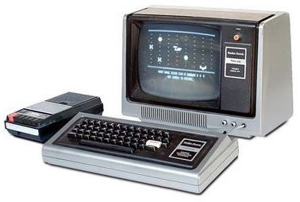
Generation 4: 1980-present. Computers have been using the technology of "Very Large-Scale Integrated Circuits (VLSIC). In a chip, this technology is able to accommodate millions circuit. This chip is called the microprocessor. Storage size has a large capacity with the speed of millions of instructions per second.


Thank you for reading and hopefully useful for all of us ..
Read more
Understanding the Internet

Nights a week from the blank blog post just passable. Toward the end of September I want to share information about the History and Understanding the Internet. As we know now is internet technology has become a staple of our everyday. From school children who seek his duties duty materials from the Internet to the business done on the internet, namely online business. Then the purpose of the internet it what ?? and how history ?? just let us discuss through the History and Understanding Internet posting.
Understanding the Internet

Internet can be interpreted as a vast computer network that involves the entire network on this earth and connects computer users from one country to another across the world, which included a variety of information resources ranging from static to dynamic and interactive.
History of the Internet

The first recorded that the social interactions that could be enabled through networking was a memo written by JCR Licklider of MIT (UMass Institute of Technology) in August 1962. In the memo described the concept of "Galactic Network" her. He has a vision of a global network of interconnected computers where anyone can access data and programs from any site. The spirit of the concept was very much like the Internet of today. Licklider was the first head of the computer research program at DARPA, 4 starting in October 1962.

While at DARPA he collaborated with Ivan Sutherland, Bob Taylor, and MIT researcher Lawrence G. Robert. Leonard Kleinrock at MIT published the writings titled "The first paper on packet switching theory" in the month of July 1961 and "The first book on the subject" in 1964. Kleinrock agree with Robert in theoretical feasibility of communications using packets of data from the system only uses a electronic circuits. This theory is the forerunner to the computer network. Her other important step is to make the computers talk together. To prove this point, in 1965, Robert in collaboration with Thomas Merrill, connected the TX-2 computer in Mass Q-32 in California with a channel low-speed dial-up. This is an extensive network of first computer ever made for the first time although on a small scale. Results from this experiment is evidence that the use of the time-shared computers could work well together, running programs and retrieving data as necessary on the remote machine, but the circuit switched telephone system was totally inadequate for this. Kleinrock's conviction of the need for packet-saklaran proven pen.

In August 1968, after Roberts and the DARPA project funders revising the overall structure and specifications for the ARPANET, an RFQ was released by DARPA for the development of one key component, pen-saklaran package called Interface Message Processors (IMP's).
The RFQ was won in December 1968 by a group headed by Frank Heart of Bolt Beranek and Newman (BBN). As the BBN team worked on the IMP's with Bob Kahn playing a major role in the architectural design of ARPANET. Network topology and economics were designed and optimized by Robert with Howard Frank and his team at Network Analysis Corporation. Measurements carried out by the network system Kleinrock's team at UCLA. 6 Since the early development theory pen packet-saklaran by Kleinrock, and his focus on analysis, design and measurement, his Network Measurement Center at UCLA was selected as the first node of the ARPANET project. This


happened in September 1969 when BBN installed the first IMP at UCLA and the first host computer was connected. Project Doug Engelbart who work on "Augmentation of Human Intellect" (in which there NLS, an early hypertext system) at Stanford Research Institute (SRI) provided a second node. SRI supports Network Information Center, led by Elizabeth (Jake) Feinler and acts as custodian of table host name to address mapping in accordance with RFC's directory. A month later, when SRI was connected to the ARPANET, the first message from the host to have been sent from Kleinrock's laboratory to SRI. Two more nodes were added at UC Santa Barbara and University of Utah. These last two nodes create visual application projects, with Glen Culler and Burton Fried at UCSB investigating methods for display of mathematical functions using the "storage displays" in order to answer the "problem of refresh" that occur in the network. Robert Taylor and Ivan Sutherland at Utah investigating methods of 3-D in the network. So that at the end of 1969, four host computers have joined together in the initial ARPANET, the forerunner of the Internet was born.
Many computers connected to the ARPANET in the following years and the team work complements the function of Host-to-Host protocol and other network software. In December 1970, the Network Working Group (NWG) working under the leadership of S. Crocker completed the initial ARPANET Host-to-Host protocol, and called the Network Control Protocol (NCP). ARPANET sites completed implementing NCP.

In 1971, Ray Tomlinson managed to complete the e-mail program that he created a year ago for the ARPANET. E-mail program is so easy that instantly became popular. In the same year, the icon "@" was also introduced as an important symbol that indicates "at" or "on". In 1973, ARPANET computer network were developed outside the United States.

Computer University College in London is the first computer that is outside the United States who are members of the network Arpanet. In the same year, two computer experts that Vinton Cerf and Bob Kahn presented a bigger idea, which became the forerunner of the Internet thinking. This idea was presented for the first time at the University of Sussex.
The next historic day is March 26, 1976, when the Queen of England managed to send an e-mail from the Royal Signals and Radar Establishment in Malvern. A year later, already more than 100 computers on ARPANET joined to form a network or network. In 1979, Tom Truscott, Jim Ellis and Steve Bellovin, creating the first-named newsgroups USENET. 1981 France Telecom creates a buzz by launching the first television telephone, where people can call each other while associated with the video link.

Because the computers that form a network of daily increasing, it needed a formal protocol that is recognized by all networks. In 1982 established Transmission Control Protocol or TCP and Internet Protocol or IP that we know it all. Meanwhile in Europe appear counter computer network known as Eunet, which provides computer network services in the countries of the Netherlands, the UK, Denmark and Sweden. Eunet network providing e-mail and USENET newsgroups.
To homogenize the address on existing computer networks, then in 1984 introduced the domain name system, which is now known by DNS or Domain Name System. A computer connected to a network that is already more than 1000 computers. In 1987 the number of computers connected to the network soared 10-fold to 10,000 more widened.

In 1988, Jarko Oikarinen of Finland discovered and once introduced the IRC or Internet Relay Chat. A year later, the number of interconnected computers soared 10-fold in a year. No fewer than 100,000 computers are now forming a network. 1990 is the year of the most historic, when Tim Berners Lee to find a program editor and browser that can roam from one computer to another computer, which form a network. The program is called www, or the World Wide Web.
In 1992, computers that are connected to form a network already exceeded a million computers, and in the same year the term surfing the internet. In 1994, the website has grown to 3000 pages address, and for the first time in a virtual-shopping or e-retail surfaced on the internet.
With the above description of my friends may be more to increase knowledge and understanding about the history of the internet. May be useful..
Read more
Definition of the technology

Definition of the technology is very much but I would refer to wikipedia Indonesia alone to be easily understood by people awam.Teknologi Applied practical means of knowledge, especially in certain areas. Or it could be the ability that is given by the practical applications of science. In our daily life we ​​can meet a wide range of technologies that we use. And the definition of technology in the most extensive sense is as entities, objects or intangible, which are created in an integrated manner through the action and thinking to reach a value. In this usage, technology refers to tools and machines that can
used to solve problems in the real world. Historically evolving technology in evolution. From ancient times such as at the wheel of his find which could enable people to move goods or cargo are also referred to as the early technology. Until its technology is found new methods which enable people to perform daily work. For the new method may be most of the people have the necessities of life. Such as televisions, refrigerators, washing machines and many more.

In the application of the technology was also divided into three basic classifications are:

1. Advances in technology neutral (his English language: neutral technological progress)
Occurs when the level of expenditure (output) achieved higher the quantity and combination of factors income (input) the same.

2. Advances in labor-saving technology (its English language: labor-saving technological progress)
The technological advances that have occurred since the end of the nineteenth century, much characterized by a rapid increase in labor-saving technology in producing everything from beans to bike up the bridge.

3. The capital-saving technological advances (his English language: capital-saving technological progress)
A relatively rare phenomenon. This is mainly because almost all science and technology research in the world is done in developed countries, which is intended to save labor, not capital.

Technology was not entirely positive impact in people's lives. Consequences of developments in technology and the natural environment is inversely proportional. Increasingly technology is growing rapidly, the more backward or corrupt our natural environment. An example is with its many industrial technology factory that are around us that our natural environment has narrowed and damaged by industrial wastes by the plant. With the soap, laundry soap will also cause damage to the river water because of the pollution of our household waste. But there are also technologies created to assist the development of nature or the environment. Her example as fertilizer production technology and manufacturing technology of seeds of a plant. But even then still differ between natural and already mixed technology (I personally choose the natural course hehehe ..).

To address it in need of attention and awareness by our own great as actors in the application of technology to everyday life. Not intend to patronize but only intends to urge for the preservation of our environment very well not ?? (aa word 'games hehehe ..)

Read more
Saturday, December 5, 2015
World's Largest People Gathering In Karbala - Chehlum of Imam Hussain (A.s) in Iraq

Most of the People know that a world largest Gathering is in karbala. Every year people visit The Karbala on 1 Moharram till 40 moharram they stay 40 days in karbala. Estimated 25 million People visit karbala every year. it is a world record. and many People Protest every year 2 months and 8 days Because of Martyr of Imam Hussain (A.S) and Because of hard time he and his family faced.
Read more
Thursday, December 3, 2015
SQL Injection with Advanced Hackbar


Sebenarnya hackbar yang ini hampir sama dengan hackbar versi original nya, hanya saja lebih powerfull karena ada penambahan tools seperti bypass WAF, Dump in One Shoot ( DIOS ) , dll.  Yang kalian butuhkan hanya mencari jumlah kolom dan angka ajaib nya, dan, hajar dengan DIOS.

Untuk file nya bisa download sisini ;


Tinggal klik kanan > open with firefox > install addons.


Untuk cara menggunakannya bisa lihat video dibawah :


Sekian dan semoga bermanfaat.


Read more
Friday, November 27, 2015
vBulletin Version 5.x.x Remote Code Execution Exploit


vBulletin memang banyak sekali bug meskipun termasuk forum premium karena jika kita ingin memakai harus membeli terlebih dahulu. Baru baru ini ditemukan celah dimana attacker bisa melakukan eksekusi secara remote di cms vb versi 5.x.x.

Exploit Source :


Save dengan ekstensi .pl . contoh vb.pl


lalu masukkan command 


perl vb.pl


Setelah itu masukkan target .


Jika sukses maka kalian bisa memasukkan command seperti dibawah :


Untuk video nya bisa lihat di link dibawah :


Sekian tutor kali ini semoga bermanfaat.

Read more
Wednesday, November 18, 2015
Eksploitasi CMS vBulletin 5.1.2 dengan Metasploit

Kali ini saya akan share tutorial eksploitasi vBulletin 5.1.2 dengan Metasploit. Meskipun saat ini vb sudah melakukan upgrade, namun masih banyak website yang belum mengupdate vb nya ke versi terbaru, jadi masih menyimpan celah.

Pertama, tambahkan module berikut ke metasploit :

https://dl.packetstormsecurity.net/1511-exploits/vbulletin_unserialize.rb.txt

Tutorialnya bisa dilihat disini :

Cara Menambahkan Exploit Baru ke Metasploit


Saat di load via msfconsole, ada beberapa opsi  yang perlu kalian set hanya RHOST dan TARGETURI.

TARGETURI isi dengan path vbulletin diistall, RHOST isi dengan host target / url .


Jika belum jelas, bisa lihat video tutorialnya berikut :

https://www.youtube.com/watch?v=SgTe0d30nqs
Read more
Saturday, November 14, 2015
SMS Spoofing Menggunakan BackBox Linux

SMS Spoofing adalah fitur yang terdapat di tool S.E.T . Sayangnya di update-an SET terbaru, firut tersebut dihilangkan sehingga kita tidak lagi bisa menggunakan SMS Spoofing. Tapi kita tetap bisa menggunakan fitur tersebut jika menggunakan versi SET lama. Cara installnya ? Simak tutor berikut .

Pertama, buka terminal.

lalumasuk ke folder tujuan dimana SET akan ditaruh.


linuxsec@sistem:~% cd tools

linuxsec@sistem:~% mkdir set

linuxsec@system:~% cd set

linuxsec@system:~% wget wget https://github.com/trustedsec/social-engineer-toolkit/archive/5.4.8.zip && unzip 5.4.8.zip

linuxsec@system:~% cd social-engineer-toolkit-5.4.8

linuxsec@system:~% mv * /home/uzumaki/tools/set

linuxsec@system:~% cd ..

linuxsec@system:~% chmod +x setoolkit

linuxsec@system:~% sudo su

root@system:/home/uzumaki/tools/set# ./setoolkit


Lalu..


Fitur SMS Spoofing masih ada.


Sekian tutor kali ini dan semoga bermanfaat.
Read more
Thursday, November 12, 2015
 ‪UpgradeYour World‬ ‪‎MICROSOFT Pakistan Tour‬ - Microsoft in Pakistan City Faisalabad

Microsoft in Pakistan City Faisalabad
Ghanta Ghar Clock Tower - Faisalabad is one of the oldest monuments still standing in its original state from the period of the British Raj.
Today's destinations are Govt. Post Graduate College Samanabad & Govt. College For Women Madina Town. Join us to ‪‎UpgradeYourWorld‬ ‪‎MSPakistanTour‬
Upgrade to Windows 10 B/C it is Awesome
‪#‎msftimagine‬ and ‪#‎youthspark‬
Read more
 Windows10 UpgradeYourWorld campaign in Pakistan - Microsoft in Pakistan city Multan

Microsft in Pakistan city Multan
Did you know that Multan is located in a bend created by 5 rivers of central Pakistan? The Mausoleum of Shah Rukn-e-Alam is a must see if you are around!
Today we are visting Govt. Emerson and Post Graduate Colleges to discover all the features of Windows 10. Who's in? ‪#‎UpgradeYourWorld‬ ‪#‎MSPakistanTour‬

Upgrade to Windows 10 B/C it is Awesome
‪#‎msftimagine‬ and ‪#‎youthspark‬
Read more
Tuesday, November 10, 2015
Cara Install Simple Screen Recorder di Ubuntu Linux

Kali ini saya akan share tutorial install SimpleScreenRecorder di Ubuntu Linux. Aplikasi ini berguna untuk merekam desktop di Linux. Kelebihan aplikasi ini adalah lebih ringan dari aplikasi yang lain dan cara menggunakannya cukup mudah.

Oke langsung saja ke tutorial :

Buka terminal dan masukkan command berikut :


sudo add-apt-repository ppa:maarten-baert/simplescreenrecorder && sudo apt-get update
sudo apt-get install simplescreenrecorder


Selanjutnya buka aplikasinya.


Contoh hasil rekaman menggunakan simple screen recorder :

https://www.youtube.com/watch?v=iQYlbwOAVzs


Sekian tutorial kali ini, semoga bermanfaat.
Read more
Sunday, November 8, 2015
Cara Install Birdie Twitter Client di BackBox Linux

Kali ini saya akan share tutorial install Birdie Twitter Client for Linux. Aplikasi ini menurut saya merupakan aplikasi Twitter Client yang paling bagus karena ringan dan tidak memerlukan untuk penginstallan komponen lain contohnya Choqok yang membutuhkan Kubuntu Libraries.

Step - step :

Pertama, download Birdie di web resminya.

Download Birdie Twitter Client for Linux


Pilih yang sesuai dengan OS. Contoh saya menggunakan BackBox 64Bit sehingga saya pilih Ubuntu 14.04 amd64. ( BackBox masih turunan Ubuntu )


Bisa download via browser atau ambil url nya untuk get via terminal.

uzumaki@system:~$ wget https://github.com/birdieapp/birdie/releases/download/1.1/birdie_1.1.0.r421.pkg19.ubuntu14.04.1_amd64.deb -O birdie.deb


Selanjutnya 


uzumaki@system:~$ sudo dpkg -i birdie.deb


Setelah selesai, panggil via terinal dengan command


uzumaki@system:~$ birdie


Setelah itu silahkan pilih " Add an existing Twitter Account " jika kalian sudah punya akun.


Ini tampilannya :


Read more
Saturday, November 7, 2015
Cara Install Facebook Messenger di Linux

Kali ini saya akan share tutorial install facebook mesenger di linux. Jadi memudahkan jika ingin membalas chat dll. Cara install nya cukup mudah. Langsung saja ke tutorial .

Pertama , download apps nya di http://messengerfordesktop.com/ .

Pilih yang sesuai dengan kebutuhan, contoh Linux 64 Bit maka ambil yang Linux amd64 .

Copy url nya, buka terminal lalu masukkan command berikut :

jack@backbox:~$ wget https://github.com/Aluxian/Facebook-Messenger-Desktop/releases/download/v1.4.3/Messenger_linux64.deb -O messenger.deb && sudo dpkg -i messenger.deb .


Setelah itu buka via terminal dengan command : messengerfordesktop


Login dengan akun kalian.


Sekian dan semoga bermanfaat.
Read more
Merubah Resolusi Gambar dengan GIMP di Linux

Gimp adalah aplikasi editing gratis yang biasanya sudah pre-installed di OS Linux. Aplikasi ini tidak kalah menarik dengan software Windows macam Adobe Photoshop. Kali ini saya akan share tutorial simple, yaitu mengubah resolusi foto / gambar di Linux menggunakan aplikasi GIMP.

Kadang kita perlu untuk mengubah resolusi piksel foto yang akan kita unggah karena alasan tertentu. Contohnya saat mengupload foto untuk header channel Youtube.

Oke langsung saja ke tutorial.

Pertama, buka gambar yang akan diganti resolusinya dengan GIMP. Caranya, klik kanan > open with > Open with " GIMP Image Editor "


Selanjutnya, klik menu Image > Scale Image

Selanjutnya atur sendiri piksel yang diinginkan.


Kalau sudah, klik Scale .


Selanjutnya, klik menu File > Export As .

Silahkan simpan dengan nama baru.


Read more
Tuesday, November 3, 2015
Tutorial Install Cinnamon Desktop Environment di BackBox Linux


Kali ini saya akan share tutorial install Cinnamon Desktop  Environment di BackBox Linux. Seperti yang kita ketahui, BackBox Linux memakai XFCE sebagai DE bawaan. Mungkin ada yang merasa kurang puas dan ingin mencoba DE lain. Dan saya pribadi lebih tertarik ke Cinnamon.

Oke, berhubung xfce tidak memiliki session manager seperti gnome, lebih dulu kita install Gnome Desktop. Cara Install Gnome Desktop di BackBox Linux.


Selanjutnya install DE Cinnamon dengan perintah berikut :


sudo add-apt-repository ppa:lestcape/cinnamon

sudo apt-get update

sudo apt-get install cinnamon


Selanjutnya reboot BackBox kalian.


Saat login, pilih sessionnya ke Cinnamon.


Tinggal di tweak biar lebih bagus :D


Sekian tutor kali ini dan semoga bermanfaat.

Read more
no image


Yooshh.. jumpa lagi kali ini saya akan share tutorial Wordpress Ajax Load More PHP Upload Vulnerability. Exploit ini membutuhkan metasploit. Jadi yang belum install , bisa install dulu. Exploit source nya dari Exploit-DB .

Langsung saja ke tutorial.


Download Exploit nya disini : https://www.exploit-db.com/exploits/38660/


Tambahkan module diatas ke metasploit kalian . Jika masih ada yang bingung bisa lihat di artikel ini :


Ada opsi berikut di Exploit nya :

RHOST : isi dengan host dari target kalian.

TARGETURI : isi dengan path dimana wordpress berada. contoh /blog , /wordpress, atau bisa juga di root path nya .

WP_USERNAME : isi dengan username wordpress nya.

WP_PASSWORD : isi dengan password wordpress nya.


Untuk lebih jelasnya bisa lihat video nya di link berikut :


Wordpress Ajax Load More PHP Upload Vulnerability


Lalu bagaimana cara patch nya ?

Upgrade plugins kalian ke versi terbaru. Karena exploit ini hanya bisa sampai di versi 2.8.1.1


Sekian tutorial kali ini dan happy exploiting.

Read more
Sunday, November 1, 2015
Earn Money From Social Website

Earn Money From Social Media:
Today i am going to show with all of you the Amazing and easy way to earn money by just posting,liking,sharing and making friends its so simple as many of you are using social websites like facebook , Twitter and Many others websites who earn millions of dollars every month but never pay a little cent to its users.
                                     Now i am going to introduce one social media which is paying its users a 90% of their own earning Which they earn when user watch or click ads of advertiser on their social website they said they distribute 90% of their earning with their users.
                                
               So the Question is how to earn money it is very easy click on below link                           https://www.tsu.co/SMAHZ 
                         then click on join button see the below image as a tutorial


when you click on join then  the Registration form will open you need to fill the registration
form see the below image
When you fill all the information then click on join &complete profile button
see the below image
 
After that the new page will open which required your more details like your profile picture
you need to fill it later. this time skip it see the below image
Also Skip this step Because tsu.co need to connect your other social networks but this time these networks are not support connection with tsu.co so skip this step see the below image

After that the page like below images will open it required you to follow few Famous people of tsu you should follow few of them after that you will received Their posts on your news feed


NOW your account is created you just need to open your email address which you written on tsu Registeration form when you check your email address


you will find tsu email like this just open it


NOW just click on verify my email

Then loginto your account then go to settings the click on privacy then check the tsu peer to peer payments then click on update button see the below image for instructions
This step is most important because peer to peer payment will provide you and me much more earning.peer to peer payment is basically that you are invited by me so you are in my peer and i am in your peer so what ever i earned a few little percent of my earning will transfer to your account and your little earning will transfer to those who are in your peer you can also invite people in your peer my just sending your invitation link which is available on invitation tab.
so peer to peer earning help you and me to grow fast earn fast . 

Important:
tsu want original people not a fake user you must also share an original content on tsu please don't copy paste other people content from tsu to tsu find and share some unique content on tsu or something which is created by you.you can see your earning on by click on bank your earning increase slow because you are New in Tsu when you grow your network by making friend and get followers and also follow other you will easily earn 50 or more dollars a day when you reach the 100$ amount you will able to get your check in your home or get money through paypal


Read more
Saturday, October 31, 2015
Cara Mudah mengatasi Unidentified Network atau Limited Access @wifi.id


Oke kali ini saya akan share tips mengatasi Unidentified Network ataupun Limited Access di Wifi ID . Banyak tutorial di google bertebaran yang menyuruh untuk mengatur manual ip nya, mendisable ipv6 nya dll. Tapi mungkin trik tersebut belum berhasil. jadi kali ini saya akan share cara yang biasa saya pakai.


Di @wifi.id corner biasanya selain ada SSID @wifi.id juga ada SSID Flash Zone untuk pengguna telkomsel. Nah kita bisa menggunakan ssid tersebut.


Asumsi saya begini, di wifi.id corner biasaya orang beli voucher langsung sehingga umumnya konek ke ssid @wifi.id yang akhirnya "rebutan" tempat . Nah ssid Flash Zone ini bakal kosong . 


Saat kita konek ke ssid Flash Zone tersebut pasti langsung konek dan tidak lagi " Unidentified Network " .


Tapi saat membuka situs lewat browser diredirrect ke halaman login Flash Zone yang tentu tidak bisa kita login menggunakan voucher wifi.id .


Coba lihat di url nya .


Biasanya kita akan di redirrect ke :


welcome9.wifi.id/wifi.id-wag/flashzone/?wlanuserip=bla bla bla.....


Kita ganti /flashzone/ menjadi /default/


welcome9.wifi.id/wifi.id-wag/default/?wlanuserip=bla bla bla.....


Look...


Sekarang silahkan login dengan voucher wifi.id yang kalian punya.


Problem solved. Sekian tutor kali ini dan semoga bermanfaat.


Cara mengatasi Unidentified Network Wifi ID


Gagal Login di Wifi ID


Cara Login Wifi ID dengan SSID Flash Zone


Read more
Friday, October 30, 2015
Menambahkan Exploit Baru di Metasploit BackBox Linux

Kali ini saya akan share tutorial menambahkan modul exploit baru di metasploit BackBox Linux. kadang ada exploit baru yang secara default belum ditambahkan di backbox linux. Contohnya modul exploit yang bisa dijumpai di Exploit-DB .


Semua exploit yang dipublish oleh user metasploit memerlukan tools metasploit untuk menjalankannya.

Sebagai contoh kali ini saya akan mencoba menambahkan exploit Nibbleblog File Upload ke Metasploit BackBox Linux.

Exploit Source :

https://www.exploit-db.com/exploits/38489/


Buka terminal :


root@unixsystem:/home/uzumaki# cd /opt/metasploit-framework/modules/exploits/

Selanjutnya buat folder baru. Untuk memudahkan karena saya ingin mengelompokkan exploit hanya dari exploit-db, saya buat folder exploit-db .


root@unixsystem:/opt/metasploit-framework/modules/exploits# mkdir exploit-db


Pindah ke dir exploit-db


root@unixsystem:/opt/metasploit-framework/modules/exploits# cd exploit-db


Modul exploit untuk metasploit selalu ditulis dengan bahasa ruby. Sehingga saat menyimpan kita save dengan ekstensi .rb


root@unixsystem:/opt/metasploit-framework/modules/exploits/exploit-db# wget https://www.exploit-db.com/download/38489 -O nibbleblog.rb


Sampai disini kita sudah menambahkan exploit baru ke metasploit kita.

Bagaimana cara menggunakannya ?


unixsystem% sudo msfconsole


Selanjutnya, karena kita tadi menyimpan di folder exploit-db , kita panggil dengan command 


msf > use exploit/exploit-db/nibbleblog


Ketik perintah show options untuk melihat command yang bsia kita pakai.


msf exploit(nibbleblog) > show options


Sekian tutor kali ini dan semoga bermanfaat.
Read more